

- Google AI Overviews Preferred Sources Explained for Students
- Setting up Preferred Sources in Google Search
- Preferred, Subscribed, and Highly Cited: three labels in AI answers
- What a Preferred label means for evaluating a source
- Why an AI answer still needs a source check
- Implications for student research
- What varies by classroom and access
- What the label changes, and what it doesn't
Google AI Overviews Preferred Sources Explained for Students
Google began rolling out a new "Preferred" label inside AI Overviews and AI Mode on May 27, letting people flag favorite websites so links from those sites stand out inside AI-generated answers, according to Google. Google AI Overviews Preferred Sources mark a site a user chose in personal settings, not a quality rating Google assigns, and that distinction matters for any student, tutor, or teacher who treats an AI search answer as a starting point rather than a finished one.
For anyone scanning a results page quickly, the label can look like a mark of trustworthiness. Google's own description is narrower: it flags a site a specific person already added to their settings, and nothing more.
The rollout follows an update earlier this year in which Google made Gemini 3 the default model powering AI Overviews worldwide, for questions where it's helpful, according to Google. That shift means more searches now surface a synthesized answer before a page of links, which is exactly the kind of answer a Preferred label can appear inside.
Setting up Preferred Sources in Google Search
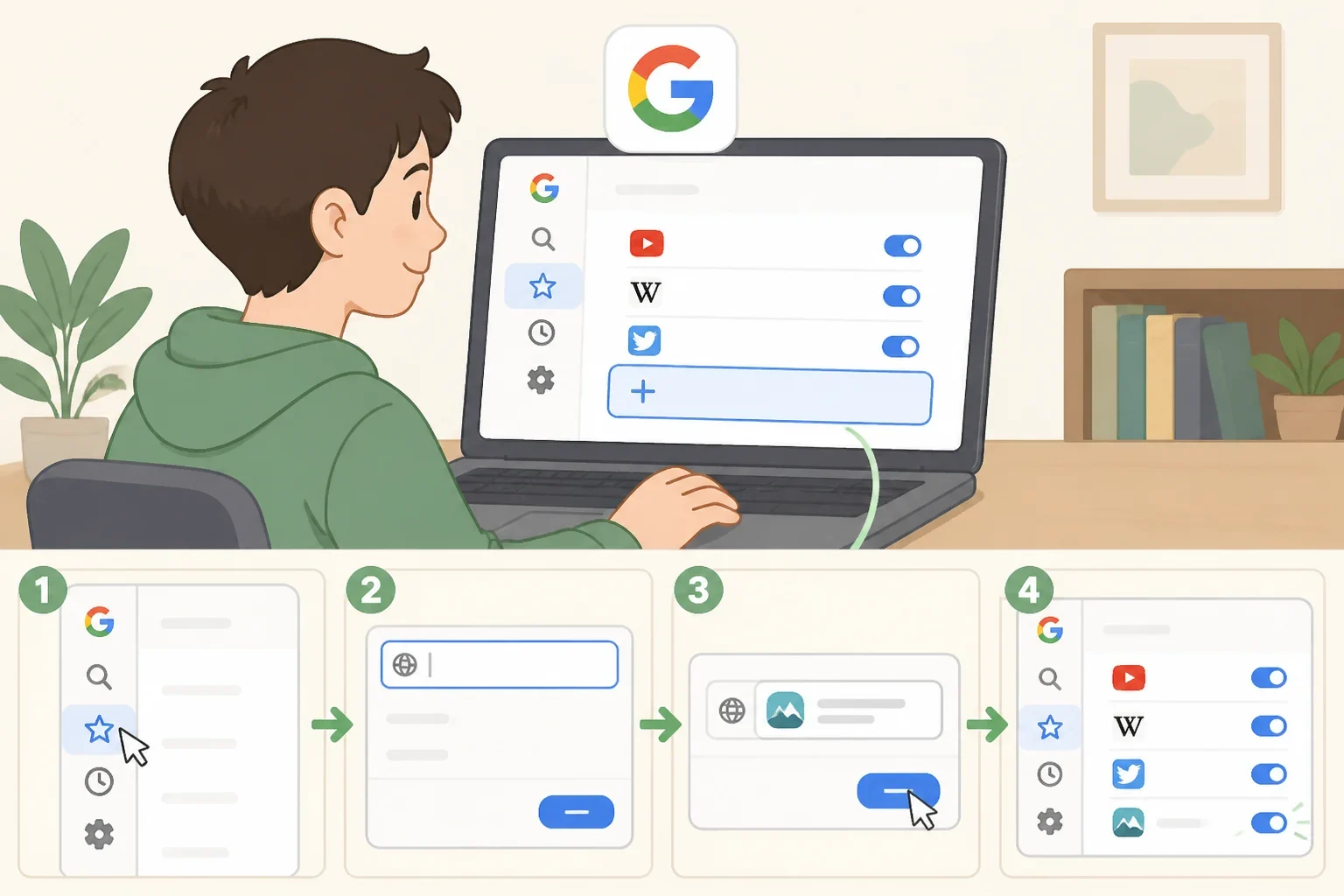
Turning on the feature takes a few steps. Setting it up means visiting Google Search source preferences and adding favorite websites there, according to Google. Once a site is added, its links carry a labeled tag in AI Overviews and AI Mode responses, working similarly to how Top Stories already highlights certain outlets, Google says.
Eligibility is broad: any website that publishes fresh content can be selected, according to Google. Google AI Mode Preferred Sources follow that same eligibility rule as the AI Overviews version, since Google's description of who qualifies doesn't differ by product.
Google reports that people are twice as likely to click through to a labeled Preferred Source, and says users have already selected more than 345,000 unique sources, according to Google.
Preferred, Subscribed, and Highly Cited: three labels in AI answers

Preferred Sources is not the only label Google has added to its AI-generated answers this year. An update earlier this year introduced a "Subscribed" tag marking links from a user's news subscriptions inside AI Mode and AI Overviews; early testing found people were significantly more likely to click those labeled links, per Google.
Google also added a "Highly Cited" badge that flags articles referenced by many other stories. Google says the badge is meant to help readers find the primary reporting that other articles reference, and it appears on web article links on the search-results page, according to Google; Google's announcement doesn't say whether the badge also shows up inside AI Overview or AI Mode responses.
The three labels do different jobs. Preferred marks a site a user added to their own source preferences. Subscribed marks a source the user already reads or pays for. Highly Cited reflects how often other publications reference a piece, as tracked by Google. None is described in Google's announcements as an accuracy review.
What a Preferred label means for evaluating a source

A Preferred tag confirms only that a site was added to someone's source preferences at some point. Because any website publishing fresh content is eligible for selection, according to Google, a student could favorite a source with an established reputation or one with no track record at all.
Treating a labeled link as a starting point rather than a verdict comes down to a few concrete steps: open the linked page, note who published it and when, find the exact passage that supports the AI's claim, and check whether the original wording adds any limits or uncertainty the summary left out. Whether the source ends up in a bibliography then depends on the citation style a class has assigned, since rules for naming an author or publisher vary by style guide.
Why an AI answer still needs a source check
Google's original pitch for AI Overviews, made in 2024, was that "Search will do the work for you," handling research, planning, and simplifying automatically, according to Google. That framing helps explain why an AI-generated summary can still feel complete rather than like a first step.
Google's language has shifted since then. An AI response is described as "often just the beginning" of exploring a topic, the company said in an update earlier this year, and it has begun rolling out changes meant to make it easier to trace a claim back to its source, according to Google.
Two of those changes affect a source check directly. Google describes inline links now appearing next to specific claims in some AI responses, rather than grouped at the bottom, and on desktop, hovering over a link can surface the site name or page title before someone clicks, per Google. Google frames these features as appearing for some searches or in many AI responses, not universally, and says it will keep testing and adjusting them.
Implications for student research
The label offers a natural way to test what a source tag does and doesn't guarantee. Google's own example, a question about what causes a Super El Niño, produces a short AI response followed by a prominent link carousel, according to Google; the same pattern shows up for any factual, checkable question rather than an opinion prompt.
Running a question like that through standard Google Search and then through AI Overviews or AI Mode surfaces two different sets of results to compare side by side. Pulling two or three specific claims out of the AI answer, a statistic, a date, a cause-and-effect statement, gives a concrete list to check, since vague summaries are harder to verify than concrete ones.
Opening the linked source behind each claim is where the comparison does its work. It shows whether the page actually states what the AI summary says it states, and whether a Preferred or Subscribed label changes anything about the accuracy of what's linked, which by Google's own description, it doesn't.
What varies by classroom and access
Not every version of this comparison looks the same from one search to the next. Google frames these features as appearing for some searches or in many AI responses, according to Google, so a classroom may not see every feature in every response, since the rollout is query-dependent.
Grade level changes what the comparison asks of a student. Younger students can work with one claim and one source at a time, focusing on identifying the author, the publication date, and whether the source directly answers the question. Older students can add a second, independent source for corroboration, plus a decision step: whether the AI's summary or the original page is what actually belongs in a citation.
Before assigning any version of this as coursework, checking a school or district's current policy on AI tool use is worth doing first. The pace of new generative AI releases has outstripped how quickly national regulatory frameworks can adapt, leaving educational institutions largely unprepared to validate the tools, according to UNESCO in guidance updated earlier this year. That doesn't mean a given school lacks a policy, but it does mean the policy is worth confirming rather than assuming.
What the label changes, and what it doesn't
Preferred Sources adds one more label to a results page that already includes Subscribed tags and Highly Cited badges. What it changes is which links stand out inside an AI-generated answer; what it doesn't change is the standard for deciding whether a source actually supports a research claim.
Students working on an assignment can treat a labeled link the same way they'd treat an unlabeled one: something to open and read before citing it. Teachers considering the comparison exercise above can confirm their school's current AI-use policy first, then decide whether to run it live or with a saved screenshot, depending on what access their students have.